
Client confidentiality
Protect client information and obtain client permission before disclosing information relating to their affairs to a third party.

AI for tax practitioners
No AI is inherently safe. That is why you need to use it in an environment designed to protect your clients, your practice and your professional responsibilities.
Holiday gives accounting practices one trusted environment for staff AI, connected business knowledge and Digital Employees, with permissions and safeguards enforced independently of the AI.
The trust problem
Accounting practices handle tax file numbers, financial records, identity documents, payroll information and highly confidential client communications.
AI can make this information more useful, but it introduces new questions. An AI provider's privacy policy alone cannot answer all of them.
The safest approach is not to trust the AI with everything. It is to control what information the AI can access in the first place.
What information can AI access?
Where does that information go?
Can AI disclose information it was never supposed to see?
Who is responsible if the AI gets something wrong?
Tax Practitioners Board
In July 2026, the Tax Practitioners Board published guidance explaining how existing professional obligations apply when tax practitioners use AI. The guidance addresses client confidentiality, permission for disclosure, professional competence, reasonable care, human supervision and record keeping.
AI can assist with tax services, but professional responsibility remains with the registered tax practitioner.
Using AI does not remove your existing professional obligations.
Protect client information and obtain client permission before disclosing information relating to their affairs to a third party.
Appropriately check and verify AI outputs before they are relied upon.
Use AI to support professional decisions rather than replace the judgement of a qualified practitioner.
Maintain appropriate oversight and control of AI used in providing services.
Retain sufficient records to demonstrate appropriate review and support compliance with professional obligations.
Understand how AI providers handle, store and potentially use client information.
From expectation to control
Client confidentiality
Reasonable care
Supervision
Records
Provider due diligence
Client permission for disclosure and the requirements that apply to tax file numbers remain the practice's responsibility. Holiday's technical controls do not replace those responsibilities.
The TPB does not endorse or approve individual AI providers. Holiday provides technical controls that may help practices manage aspects of their responsibilities. Practitioners remain accountable for compliance with their professional obligations.
A trusted AI environment
Holiday creates a separate AI environment for your business, with defined permissions, approved integrations and independently enforced security rules.
Staff can use AI to work with business information without automatically giving the AI unrestricted access to every connected system.
Every controlled tool call is checked against both the AI's permissions and the requesting person's permissions before execution. Security does not depend solely on asking the AI to behave correctly.
The rules are enforced by the environment, not by the AI model.
Questions and answers
Tax practitioners must protect confidential client information and comply with their professional obligations. Whether a particular AI tool is suitable depends on its configuration, how information is handled and whether any required client permission has been obtained.
A trusted environment with enforced access controls can help reduce risks, but it does not remove those obligations.
The TPB states that tax practitioners must obtain client permission before disclosing information relating to a client's affairs to a third party.
Whether a particular AI use involves such a disclosure depends on the circumstances and how the service is configured.
Uploading client documents may introduce confidentiality, privacy, disclosure and data handling risks. Before using an AI service, practices should assess the provider, the nature of the information, applicable client permissions and how the information is stored and used.
AI can use approved software connections subject to the security and permissions provided by the integration. Holiday adds independent authorisation controls for supported connections managed within its environment.
AI may assist practitioners with preparing work, gathering information and identifying issues. Registered tax practitioners remain responsible for checking outputs, exercising professional judgement and meeting their obligations.
Practices should establish suitable governance, staff training, client information handling processes, human review and record keeping. Technical controls and activity records can help demonstrate how AI is being managed.
No software product automatically establishes compliance with the TPB Code of Professional Conduct. Holiday provides technical controls for AI access, permissions, governance and accountability that may help practices manage relevant risks.
Example of configured access controls
Allowed information
Restricted information
Client information
An accountant may need AI to review outstanding invoices or identify missing documents. That does not mean the AI needs unrestricted access to identification documents, tax file numbers or every financial record in the practice.
Holiday can apply granular access restrictions within supported and configured integrations. Sensitive records and fields can be excluded from AI access before information is provided to the model.
This is fundamentally different from giving the AI access to everything and instructing it not to reveal confidential information.
Information the AI cannot access cannot be disclosed by that AI through the same controlled data path.
Available restrictions depend on the supported integration and its configured access boundary.
Business Chat
Accounting practices work across email, document storage, accounting software, client records and practice management systems.
Holiday connects approved business information into a structured environment where staff can ask questions across authorised sources. Instead of opening each system individually, authorised staff can search connected business knowledge through one AI conversation.
Questions your practice can ask
One question. Relevant business context. Controlled access.
Business ChatAsk Holiday
Practice accessDigital EmployeeJob Description
Identify missing client documents and prepare communications for review.
Review outstanding payments and bring exceptions to staff attention.
Summarise correspondence and identify outstanding work.
Digital Employees
Holiday Digital Employees can be assigned defined responsibilities within your practice. They operate through approved tools and permissions, with human review and approval where required.
Identify missing client documents and prepare follow up communications for review.
Review outstanding payments, identify exceptions and bring matters requiring attention to staff.
Organise relevant information, identify missing records and prepare material for a qualified practitioner to verify.
Monitor operational tasks, summarise correspondence and identify outstanding work.
Digital Employees support your staff. They do not replace the professional judgement, review or accountability required of registered tax practitioners.
These are illustrative responsibilities. Available workflows depend on supported integrations, configuration and the authority assigned by the practice.
AI governance
Professional accountability requires more than an acceptable use policy. Practices need visibility into how AI is used and evidence of the controls applied.
Holiday provides governance and activity reporting for AI operations within its managed environment. Relevant records can include requesting users, AI identities, tools, accessed resources, actions and available review outcomes.
Turn AI governance into something you can demonstrate, not simply something you have documented.
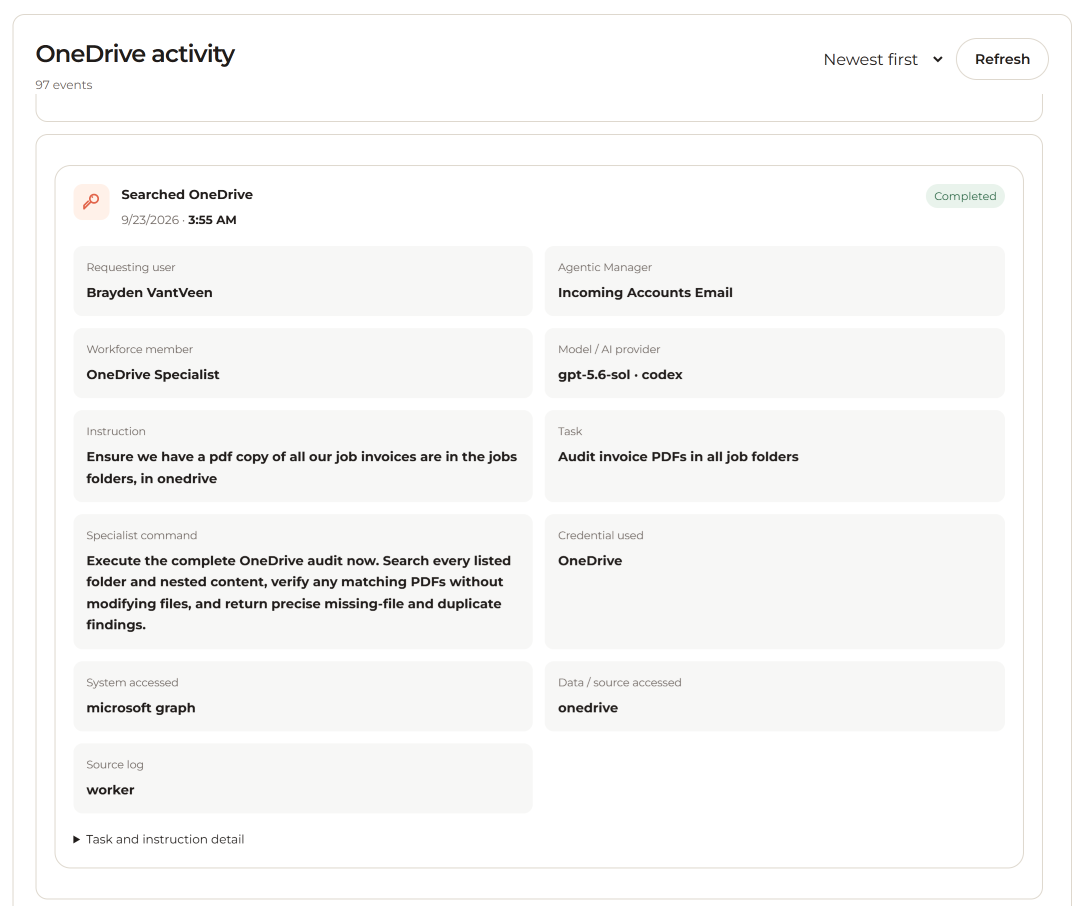
A traceable record of controlled AI activity across users, identities, systems and data sources.
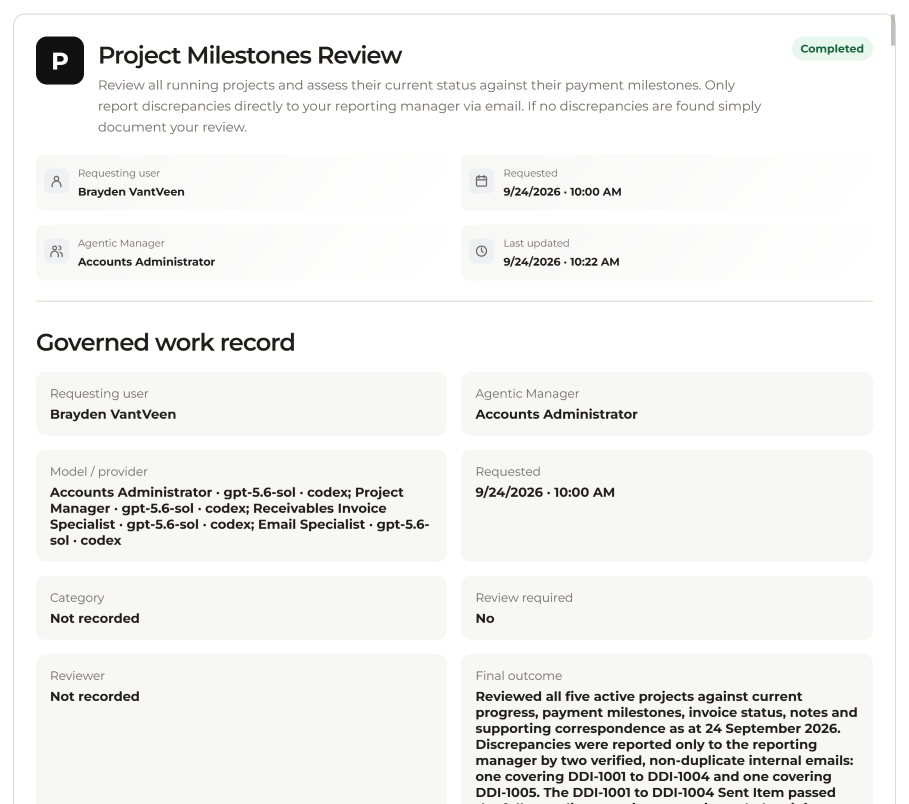
The work record, including instructions, outputs, review, approval, escalation and available outcome.
Safe AI for accounting practices
Use AI across your business without relying on the AI itself to enforce your security rules. Connect your systems, give your staff Business Chat and introduce Digital Employees within a trusted environment.
Control. Chat. Operate.